How to export your data from Instagram
Instagram is required to give you a copy of the data it holds about you, including photos, videos, messages and posts and social activity. The request itself is free, and arrives as .zip containing JSON or HTML files and media. Typical wait: minutes to a few days depending on size.
Meta Accounts Center - Download your information ->
Step by step
Every screenshot below is from Instagram's own pages on 30 July 2026.
-
Open Download your information
In the Instagram app or on the web, go to Accounts Center, then Your information and permissions, then Download your information.
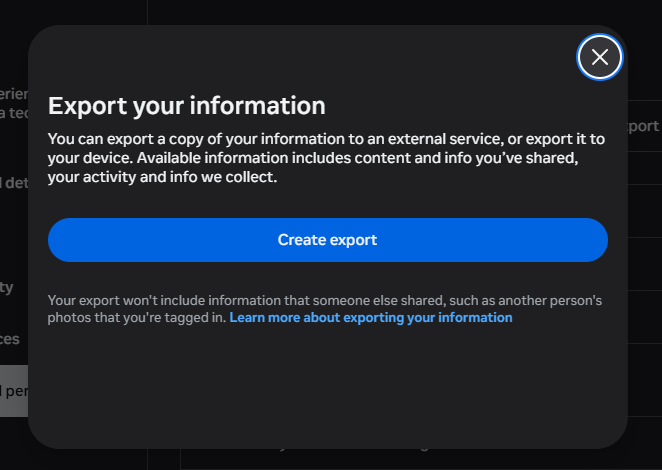
The export lives in Meta's Accounts Centre now, not in Instagram's own settings. Note what it says: photos other people posted that you are tagged in are not included, because they are not yours. -
Choose the Instagram profile
Select the Instagram account whose data you want to export.
-
Select information and range
Choose which categories to include (posts, stories, messages, and more) and pick "All time" for everything.
-
Pick format and quality
Choose JSON for machine-readable data (best for Muletto) and set media quality to high.
-
Create the file and wait
Submit the request. Meta prepares your download and notifies you when it is ready.
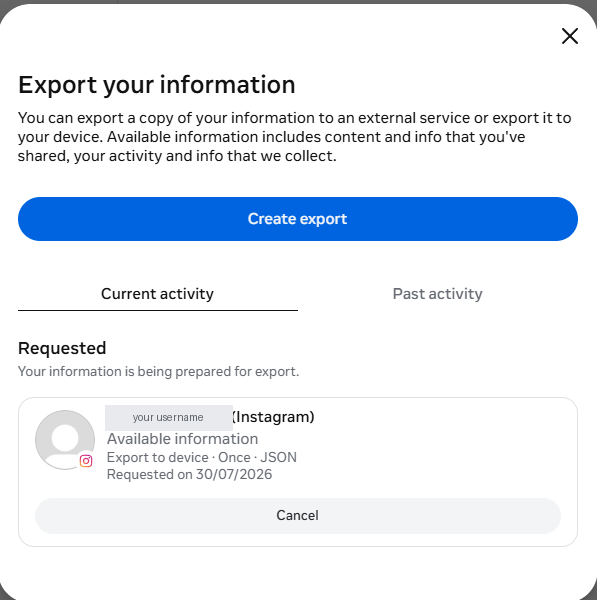
Once submitted it appears under Current activity with the settings you chose, so you can check you actually asked for JSON. -
Download the file
Download every part before the link expires and keep the files together.
Worth knowing
What Muletto does with this export
Once your download arrives, open it in Muletto. The file is read in your browser, on your own machine - nothing is uploaded. You get a breakdown of what is inside, duplicate detection, and a browsable view of your photos, messages, timeline and records.